
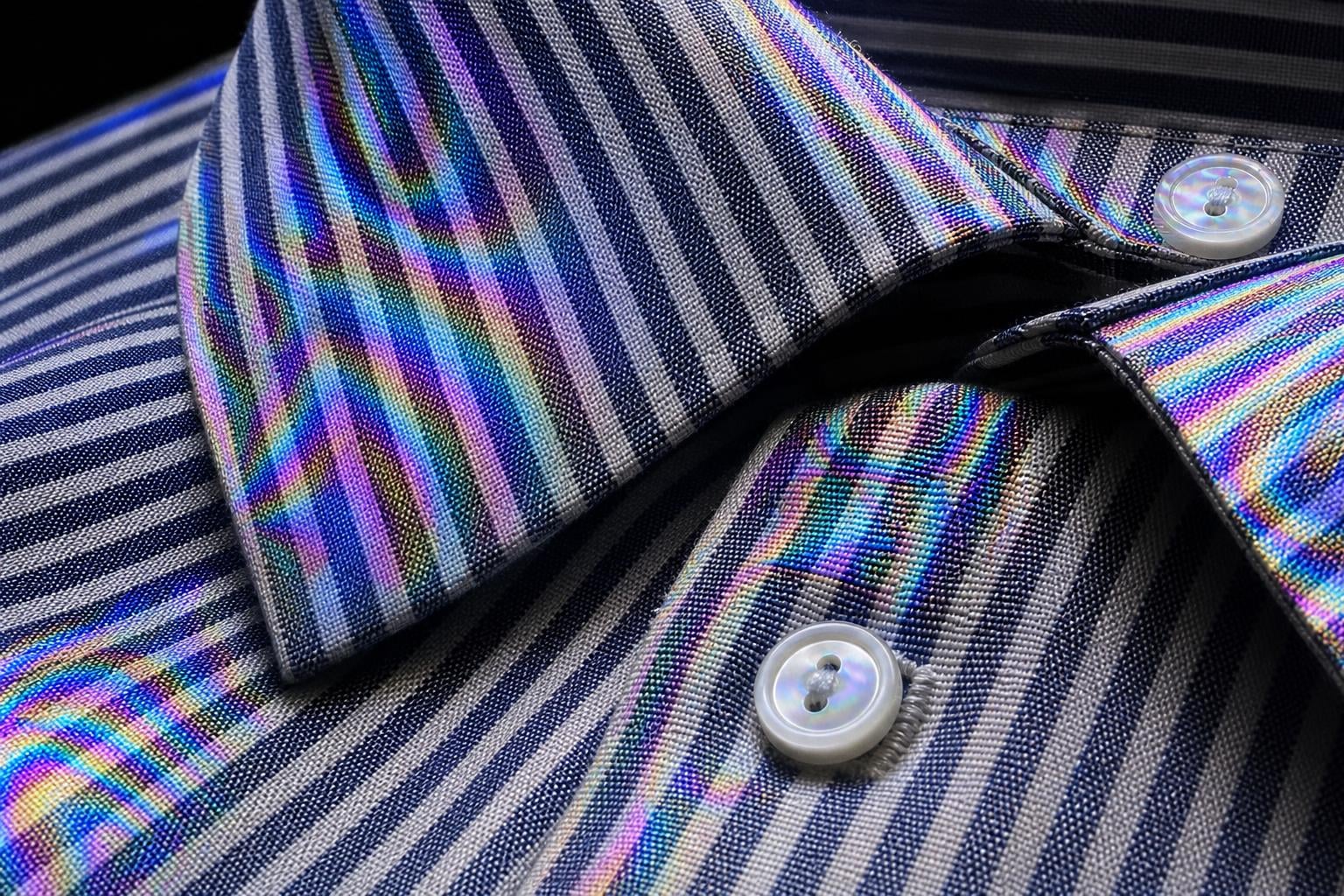
You are on a video call, wearing a nice striped button-down. Everything looks fine in the mirror. But on screen, your shirt is shimmering with strange, wavy rainbow patterns that ripple every time you move.
That distracting effect is called moire (pronounced mor-ray), and it is one of the most common visual artifacts in digital video. Understanding the moire pattern shirts video phenomenon can save your recordings, your professional calls, and your sanity.
I have spent years behind cameras dealing with this exact issue. Whether filming interviews, recording YouTube content, or joining client meetings on webcam, moire shows up at the worst moments. The good news is that once you understand why it happens, preventing it becomes surprisingly simple.
In this guide, I will break down what moire is, why shirts trigger it on video, which fabrics are the worst offenders, and how to prevent or fix it. No advanced physics degree required.
Table of Contents
What Is Moire?
Moire (pronounced mor-ray) is an interference pattern that appears when two overlapping grids or fine patterns are slightly misaligned, creating false wavy lines and rainbow-colored artifacts that do not exist in the real world.
The word comes from French. It originally referred to a rippled silk textile called mohair, which itself produced a wavy, watered appearance in the fabric. So the word literally describes the visual effect it now names in photography and video.
Think of moire like the visual version of a beat in music. When two slightly different frequencies overlap, they create a third pattern that neither source produces alone. Two guitar strings tuned slightly differently will create a pulsing wobble. Two grids offset by a small angle create a shimmering visual wobble.
The result is those psychedelic, rainbow-colored swirls and bands that crawl across your shirt on camera. They shift and dance as you move because the angle between the fabric pattern and the camera sensor constantly changes.
Moire does not only happen on clothing. You can see it when photographing brick walls, window screens, mesh fences, and even computer displays. Any scene with fine, repeating detail can trigger it. But shirts are the most common culprit because we wear them every day on camera.
How Moire Patterns Form: The Science of Interference
To understand moire, you need to picture two invisible grids working against each other. Your shirt has one grid, and your camera sensor has another. When they clash, the interference creates those rainbow patterns.
Grid Number One: The Fabric Weave
Every woven fabric is built on a grid. Threads run horizontally and vertically, interlacing in a repeating pattern. In some fabrics, this grid is coarse and easy to see, like burlap. In others, like fine dress shirts or suit jackets, the threads are packed so tightly that the repeating structure is microscopic.
Striped and checkered fabrics add another layer of repetition on top of the weave itself. A pinstripe shirt has threads forming a tight grid, plus stripes repeating every few millimeters. That is two overlapping patterns competing for attention.
Grid Number Two: The Camera Sensor
Your camera or webcam captures images using a digital sensor covered in millions of light-sensitive pixels. These pixels are arranged in, you guessed it, a precise grid. Rows and columns of tiny squares, each measuring the light hitting that exact spot.
This pixel grid is invisible to you when you look at a photo. But it is always there, sampling reality at fixed, regular intervals.
The Clash That Creates Rainbow Patterns
Here is where the moire effect kicks in. When the repeating pattern in your fabric is close in size to the spacing between pixels on the sensor, the two grids interfere with each other. The camera cannot faithfully capture the fabric pattern because it falls right at the edge of what the sensor can resolve.
This creates a false pattern, a moire artifact, that exists only in the recorded image. The real shirt looks perfectly normal. The camera literally invents colored bands and wavy lines that are not there.
The rainbow colors appear because most camera sensors use a Bayer filter, a mosaic of red, green, and blue filters over the pixels. When the fabric pattern confuses the sensor, the color reconstruction process (called demosaicing) produces incorrect color values. The result is those surreal, shifting splotches of red, blue, green, and purple.
In technical terms, this is a form of aliasing. The sensor is undersampling the fine detail in the fabric, and the math that reconstructs the image produces garbage data. The Nyquist theorem, a foundational principle in signal processing, says you need to sample at least twice as frequently as the detail you want to capture. When fabric detail exceeds half the sampling rate of the sensor, moire is the visible consequence.
Why Shirts Trigger Moire Pattern in Video
Shirts are the number one source of moire in everyday video because most shirts combine the exact ingredients moire needs: tight, regular fabric weaves plus fine printed or woven patterns. The moire pattern shirts video problem is practically unavoidable if you wear business attire on camera.
Dress shirts, suit jackets, and blazers tend to use tightly woven fabrics like poplin, twill, and broadcloth. These weaves have extremely fine, regular thread structures. The pattern is so small that your camera sensor struggles to capture it cleanly.
Add pinstripes, checks, or houndstooth to that tight weave, and you are stacking multiple layers of repetition. Each layer has its own spacing, and each can independently conflict with the sensor grid.
Knit fabrics are not immune either. Fine-gauge knits, like the cotton used in premium t-shirts, have a loop-based structure that still creates a regular repeating pattern. I have seen moire appear on solid-colored blue and gray t-shirts with no visible pattern at all. The weave itself was enough to cause interference.
This is a point many guides miss: you do not need stripes to get moire. Any fabric with a fine, regular structure can trigger it if the camera resolution and distance align just wrong. Users on photography forums frequently report this exact surprise on seemingly plain clothing.
Fabrics Most Likely to Cause Moire
After years of testing wardrobe choices on camera, I have identified clear patterns in which fabrics create moire and which are safe. Here is what to watch for.
High-Risk Fabrics
Pinstripes and fine stripes are the classic offenders. The narrow stripe spacing is a perfect match for sensor pixel pitch at typical filming distances.
Houndstooth, checkered patterns, and gingham create a two-directional grid that doubles the chances of interference with the sensor grid.
Twill weaves and herringbone have a diagonal structure that produces shifting moire as you move, because the angle of the diagonal changes relative to the sensor.
Fine merino wool and silk blends can trigger moire even without a visible pattern because the thread count is so high and regular.
Synthetic performance fabrics, especially compression shirts with fine textures, are frequent moire sources in fitness and sports content.
Safe Fabrics
Solid-color cotton t-shirts with a looser knit are generally safe. The texture is too coarse and irregular to create strong interference.
Large, bold prints avoid moire because the pattern spacing is far larger than the sensor pixel grid. There is no conflict.
Linen and chunky knits have irregular textures that break up any repeating structure. The randomness actually protects you.
Matte fabrics in dark or muted colors tend to show moire less vividly even when it occurs, because there is less light reflecting off the surface to create strong interference.
Why Video Cameras Show Moire More Than Photos
One of the most common questions I hear is: why does moire show up on my video calls but not in the photos I take with the same camera? The answer comes down to how cameras handle video versus still images.
When you shoot a still photo, the camera uses the full resolution of its sensor. A 24-megapixel sensor captures 24 million pixels of detail, which gives it plenty of sampling headroom to resolve fine fabric patterns.
Video is different. Even a 4K video frame only captures about 8 megapixels. Many cameras record 1080p video, which is just 2 megapixels per frame. The camera is throwing away the vast majority of its sensor data to produce video in real time.
To do this, cameras use techniques like line skipping (reading every other row of pixels) or pixel binning (combining adjacent pixels). Both methods reduce the effective resolution and make aliasing, and therefore moire, much more likely.
Webcams are even worse. Most laptop webcams have small sensors with aggressive processing designed for smooth video at low bandwidth. They prioritize frame rate and compression over fine detail, which is a recipe for moire artifacts.
Movement amplifies the problem. In a still photo, the moire is frozen. In video, the shifting angle between fabric and sensor makes the patterns dance and shimmer, drawing even more attention to the artifact.
Compression algorithms in video calls, from Zoom to Teams to Google Meet, apply additional processing that can amplify moire. The encoder tries to simplify the image to save bandwidth, and the moire pattern can actually become more visible after compression than it was in the raw camera feed.
How to Prevent Moire on Video Calls and Filming
Prevention is always better than correction. Here are the practical steps I use to keep moire out of my videos.
1. Choose the Right Wardrobe
This is the single most effective solution. Wear solid colors when you know you will be on camera. Medium tones like navy, forest green, burgundy, and charcoal work best. Avoid bright whites and deep blacks, which can cause exposure issues separate from moire.
Stay away from fine stripes, checks, houndstooth, pin dots, and tight twill weaves. If you must wear a patterned shirt, choose one with large, bold elements where the spacing between repeats is obvious to the eye.
2. Change Your Distance From the Camera
Moire depends on the relationship between fabric pattern size and pixel size on the sensor. Changing your distance from the camera changes how large the fabric pattern appears relative to the pixel grid.
Simply moving a foot closer or farther away can make moire appear or disappear. If you notice shimmering on your shirt during a call, try scooting your chair back or leaning forward slightly.
3. Adjust the Camera Angle
Moire is worst when the fabric grid is parallel to the sensor grid. Tilting your body slightly, turning at an angle, or adjusting the camera height can break the alignment and reduce or eliminate the interference.
4. Use a Camera With an Optical Low-Pass Filter
Many professional cameras include an optical low-pass filter (also called an anti-aliasing filter) in front of the sensor. This filter slightly blurs the image at the pixel level to prevent moire before it forms.
Some modern cameras remove this filter to maximize sharpness, trading moire resistance for detail. If you shoot a lot of video with fabric in frame, look for cameras that retain the low-pass filter.
5. Adjust Your Aperture and Focal Length
Shooting at a wider aperture (lower f-number) creates a shallower depth of field, which can soften fine fabric details enough to reduce moire. A longer focal length can also help by changing the magnification of the fabric pattern relative to the sensor grid.
6. Soften Your Lighting
Harsh, directional lighting makes fine fabric textures more visible and more likely to cause moire. Soft, diffused lighting from a large source reduces the contrast in fabric detail and can minimize interference patterns.
How to Fix Moire in Post-Production
If moire already made it into your footage, you are not out of options. Post-production tools can reduce or sometimes eliminate the effect, though the results are never as clean as preventing it in the first place.
Lightroom and Camera Raw
Adobe Lightroom and Camera Raw both include a dedicated Moire Reduction tool. It appears as a brush adjustment that lets you paint over the affected area. The tool analyzes the color fringing and attempts to desaturate the false colors while preserving real detail.
In my experience, this works well for mild moire on still images but is less effective on severe interference or video footage.
Photoshop
Photoshop offers more manual control. You can use the Gaussian Blur filter on a duplicate layer, masked to just the affected area, to smooth out the moire pattern. Follow up with a slight desaturation of the affected zone to tame the rainbow colors.
DaVinci Resolve and Premiere Pro
For video, DaVinci Resolve has a Moire Reduction effect in the OpenFX library. Premiere Pro offers similar tools through third-party plugins. These work by analyzing the temporal pattern of the moire across frames and smoothing the artifact.
The limitation of all post-production fixes is that they trade sharpness for moire reduction. You are essentially blurring the fabric detail to hide the interference, which can leave the area looking soft or unnatural.
This is why I always tell people: spend two minutes choosing a different shirt before the call. It will save you thirty minutes of post-production work later.
FAQs
What is the moire pattern on a shirt?
The moire pattern on a shirt is a false interference pattern that appears when the fine, repeating weave of the fabric clashes with the pixel grid of a camera sensor. It shows up as wavy, rainbow-colored bands that ripple across the fabric in photos and video but are not visible to the naked eye.
Why do moire patterns happen?
Moire patterns happen because of a phenomenon called aliasing. When a fine repeating pattern in a fabric is nearly the same size as the spacing between pixels on a digital sensor, the sensor cannot accurately capture the detail. The resulting mathematical mismatch creates false colors and wavy lines that appear only in the recorded image.
What is the moire pattern on a video?
Moire on video is the same interference effect as in photos, but it is often more noticeable because the patterns shift and shimmer from frame to frame. Video uses lower resolution per frame than still photography, which makes sensor aliasing more likely and moire more visible, especially on webcams and compressed video calls.
What do moire patterns visually indicate?
Moire patterns visually indicate that the camera sensor is struggling to resolve fine detail in the scene. They show up as rainbow-colored swirls, wavy lines, or dancing color bands on repeating textures like fabric weaves, striped shirts, brick walls, or screen displays. The presence of moire means the detail exceeds what the sensor can cleanly capture.
Can moire patterns damage your camera?
No, moire patterns cannot damage your camera. Moire is purely a digital artifact, a mathematical mismatch between the scene detail and the sensor resolution. It does not affect the hardware in any way and is only visible in the recorded image, not in real life.
Why do plain shirts sometimes show moire on video?
Plain shirts can show moire because even solid-colored fabrics have a regular woven structure. If the thread count is high and the weave is tight, that microscopic grid can interfere with the camera sensor grid just like a visible stripe pattern would. Fine cotton, wool, and synthetic knits are common culprits.
Conclusion
The moire pattern shirts video problem comes down to a simple clash of grids. Your shirt has one, your camera sensor has another, and when they misalign, the result is those shimmering rainbow artifacts that ruin an otherwise clean shot.
The fix is equally simple. Choose solid colors for video calls. Keep fine stripes, checks, and tight weaves for in-person occasions. When in doubt, test your outfit on camera before the meeting or recording starts.
Once you understand why moire happens, you stop fighting it in post-production and start preventing it before you hit record. That is the difference between looking professional on camera and looking like you walked through a kaleidoscope.